• New

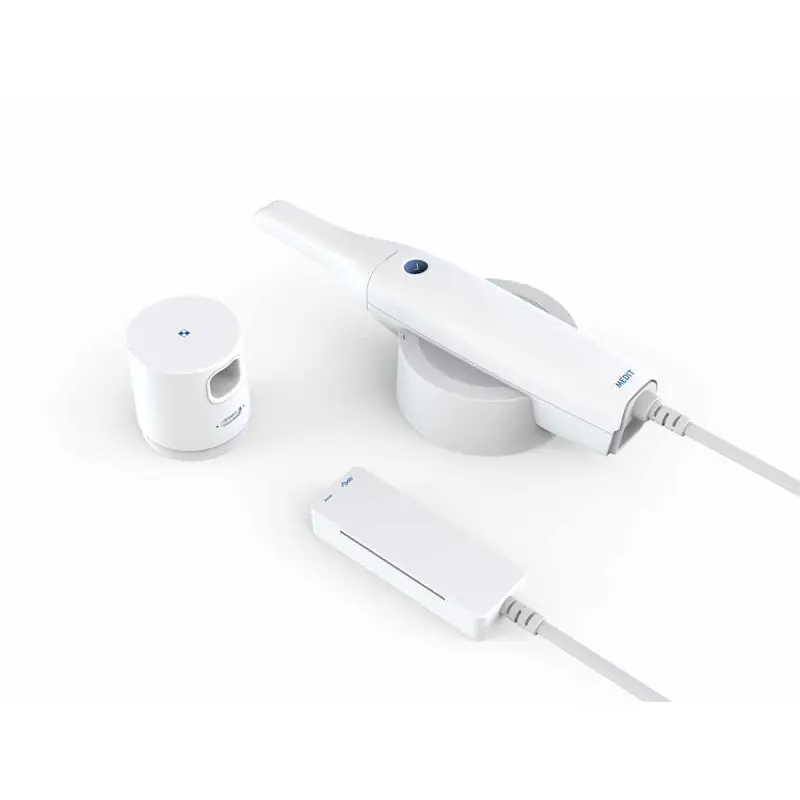
MEDIT i-500

i-500 MEDIT intraoral scanner : Accurate and efficient dental scanning

Step into the era of digital dentistry with the Medit i-500 scanner. This revolutionary scanner offers precise and fast 3D scanning of dental impressions, ensuring a smoother workflow and optimal results for your patientd.

Features :

Unmatched precision and speed: 

Two high-speed cameras  capture precise images in real time. 

Intelligent scan detection algorithm  for smooth and efficient scanning. 

3D motion video technology  for precise scanning of dental surfaces. 

Powder-free scanning  in most cases, for increased patient comfort. 

Efficiency and time saving: 

One-button control  for easy operation. 

Intuitive Medit LINK software  for managing acquisitions and orders. 

Easy transfer of files  to dental prosthesis laboratories. 

Reduced processing time  compared to traditional impressions. 

Versatility and multiple applications: 

Indicated for diagnostic and preoperative , occlusion analysis and orthodontic treatment planning. 

Used for the design of dental prostheses , crowns, bridges and implants. 

Enables the creation of accurate 3D models  for better communication with patients and laboratories. 

Increased patient comfort: 

Fast and painless scanning . 

Elimination of the need for unpleasant impression paste  . 

Better visualization of dental structures  for more accurate diagnosis. 

MEDIT’s i-500 intraoral scanner is an indispensable tool for dentists who want to improve their efficiency, provide better service to their patients and adopt the latest technologies in digital dentistry. 

OTHERS IN SAME CATEGORY

Panel Tool

Full Width Boxed Large
Yes No

Live Theme Editor

Clear

Those Images in folder YOURTHEME/assets/img/patterns/

  • Attachment
  • Position
  • Repeat
Clear
Clear

Those Images in folder YOURTHEME/assets/img/patterns/

  • Attachment
  • Position
  • Repeat
Clear
Clear
Clear
Clear
Clear
Clear
Clear
Clear

Those Images in folder YOURTHEME/assets/img/patterns/

  • Attachment
  • Position
  • Repeat
Clear
Clear

Those Images in folder YOURTHEME/assets/img/patterns/

  • Attachment
  • Position
  • Repeat
Clear
Clear
Clear
Clear
Clear

Those Images in folder YOURTHEME/assets/img/patterns/

  • Attachment
  • Position
  • Repeat
Clear
Clear

Those Images in folder YOURTHEME/assets/img/patterns/

  • Attachment
  • Position
  • Repeat
Clear
Clear
Clear
Clear
Clear

Those Images in folder YOURTHEME/assets/img/patterns/

  • Attachment
  • Position
  • Repeat
Clear
Clear

Those Images in folder YOURTHEME/assets/img/patterns/

  • Attachment
  • Position
  • Repeat
Clear
Clear
Clear
Clear
Clear

Those Images in folder YOURTHEME/assets/img/patterns/

  • Attachment
  • Position
  • Repeat
Clear
Clear

Those Images in folder YOURTHEME/assets/img/patterns/

  • Attachment
  • Position
  • Repeat
Clear
Clear
Clear
Clear
Clear
Clear
Clear
Clear
Clear
Clear
Clear
Clear
Clear
Clear
Clear
Clear
Clear
Clear
Clear
Clear
Clear
Clear
Clear

Those Images in folder YOURTHEME/assets/img/patterns/

  • Attachment
  • Position
  • Repeat
Clear
Clear

Those Images in folder YOURTHEME/assets/img/patterns/

  • Attachment
  • Position
  • Repeat
Clear
Clear
Clear
Clear
Clear
Clear

Those Images in folder YOURTHEME/assets/img/patterns/

  • Attachment
  • Position
  • Repeat
Clear
Clear

Those Images in folder YOURTHEME/assets/img/patterns/

  • Attachment
  • Position
  • Repeat
Clear
Clear
Clear
Clear
Clear
Clear

Those Images in folder YOURTHEME/assets/img/patterns/

  • Attachment
  • Position
  • Repeat
Clear
Clear

Those Images in folder YOURTHEME/assets/img/patterns/

  • Attachment
  • Position
  • Repeat
Clear
Clear
Clear
Clear
Clear
Clear

Those Images in folder YOURTHEME/assets/img/patterns/

  • Attachment
  • Position
  • Repeat
Clear
Clear

Those Images in folder YOURTHEME/assets/img/patterns/

  • Attachment
  • Position
  • Repeat
Clear
Clear
Clear
Clear
Clear
Clear
Clear
Clear
Clear
Clear
Clear
Clear
Clear
Clear
Clear
Clear
Clear
Clear
Clear
Clear
Clear
Clear
Clear
Clear
Clear
Clear